When Ignite on FHIR usage varies across your organization, it's hard to know where to focus your efforts. Our new facility-level reports are designed to provide that clarity. They help you quickly pinpoint locations needing support and your high-performing sites, where you can connect with your advocates and share their winning strategies system-wide..
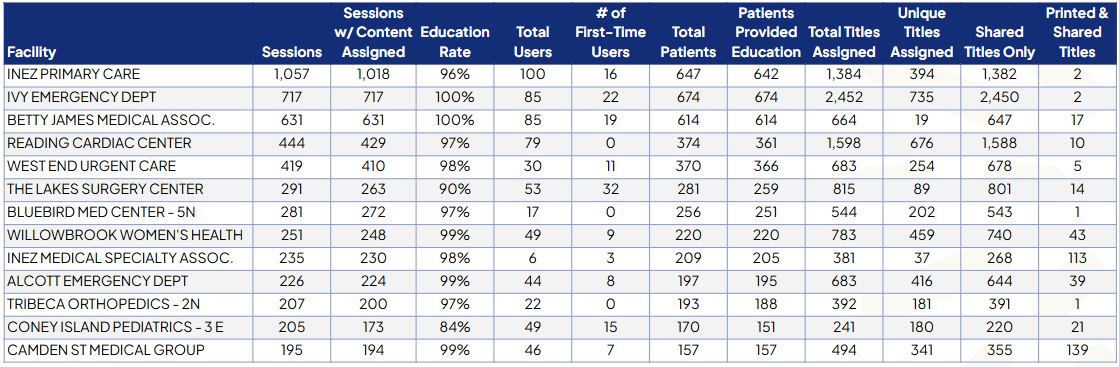
Facility Overview report
What it is
Features key utilization metrics, including education rate, number of unique users, number of unique patients, and total titles assigned (for a refresher on all Ignite on FHIR utilization metrics and definitions, download our quick guide.)
How to use it
Benchmark your facilities to quickly identify gaps in adoption and understand what drives top performance..
- Track training impact: Doing a training push at a specific facility? Look for a lift in unique and first-time users to gauge effectiveness.
- Compare similar locations: For facilities with comparable patient volume, number of clinical staff, or specialty area, check for variances in utilization. If one primary care location has noticeably more content assignments than another, consider rounding at the other location to understand workflow differences, offer more training, or identify a champion to support adoption.
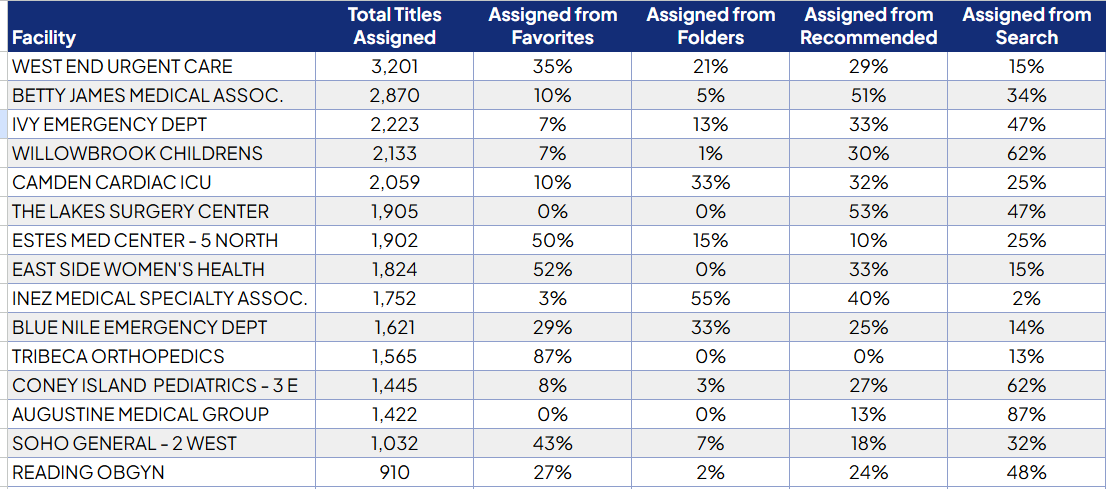
Facility Assignment Origin report
What it is
Shows you how much content each facility assigns and where they’re finding it within their workflow.
How to use it
Look for opportunities to establish more efficient workflows and reduce friction for your clinicians. For example, if a location relies heavily on manual search, you can encourage them to set up Folders or use Favorites for frequently assigned content, saving valuable time. See how one client found success with this approach.
Insights at every level
These new reports provide ready-made views of key metrics and trends. For a deeper dive, you can still request the session log (raw data export) to slice and dice the data.